长方体正方体体积交互式课件的制作
- 2026-08-02 14:30:49
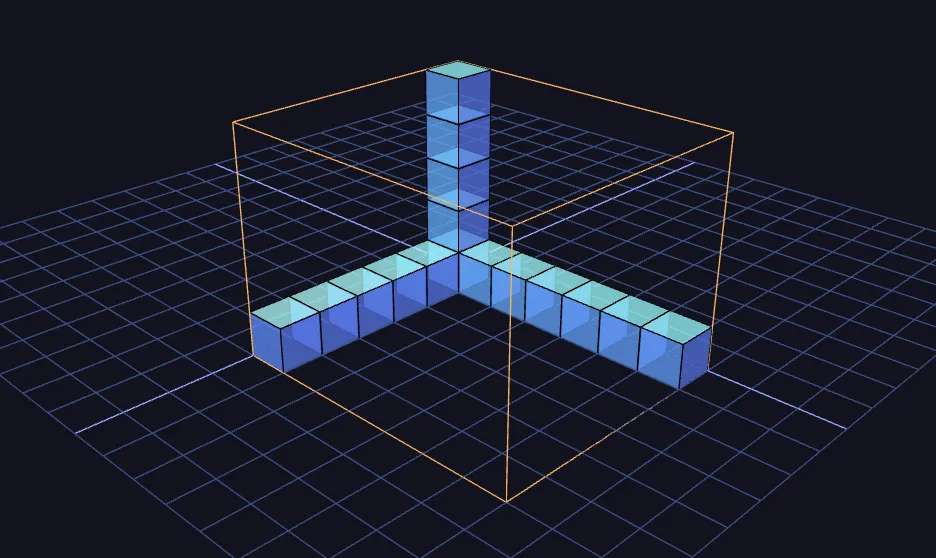
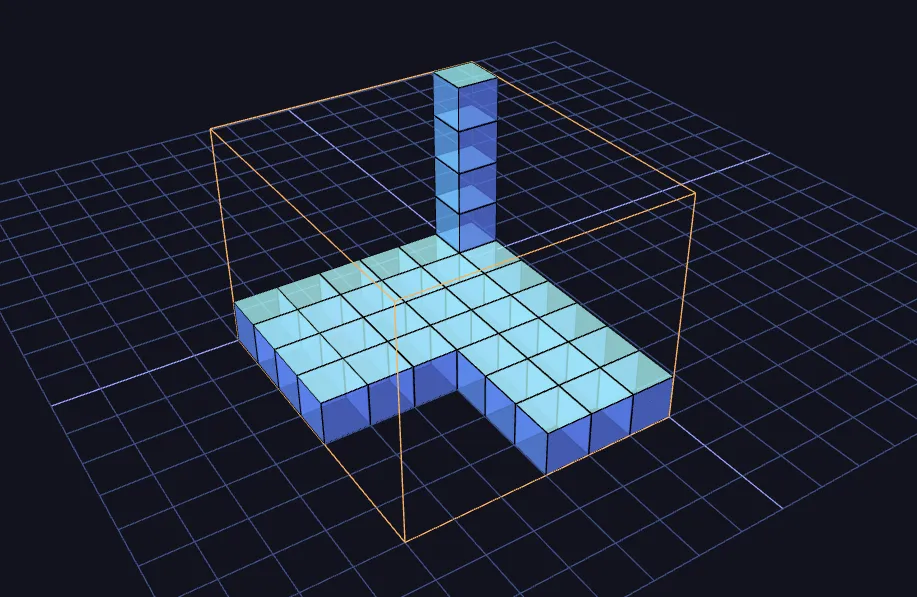
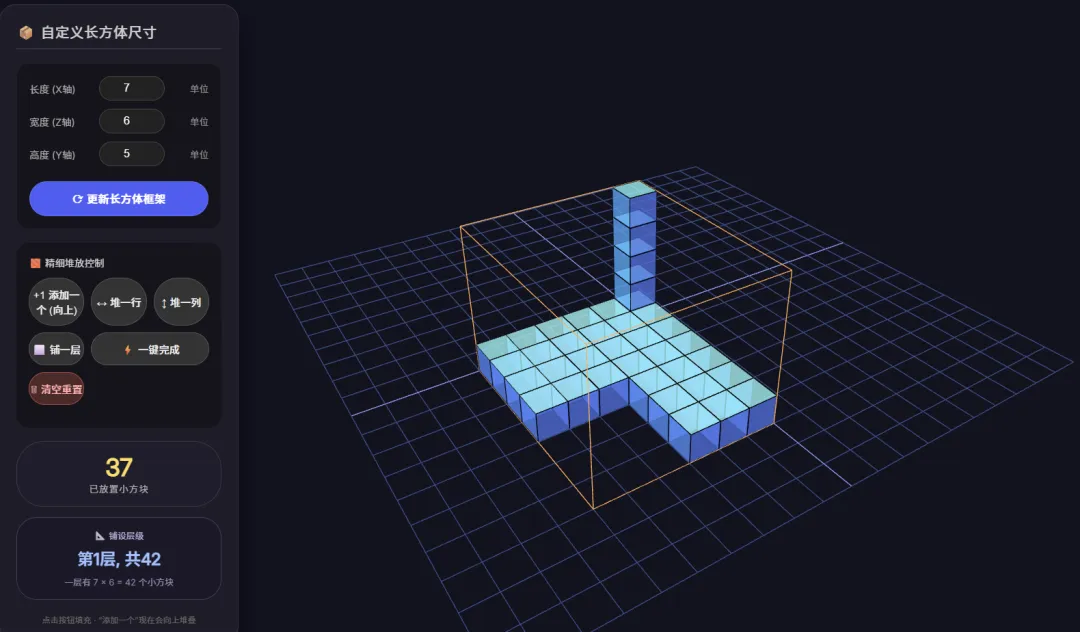
<!DOCTYPE html>
<html lang="zh-CN">
<head>
<meta charset="UTF-8">
<meta name="viewport" content="width=device-width, initial-scale=1.0, user-scalable=no">
<title>长方体体积探究 · 柱状优先添加</title>
<link href="https://fonts.googleapis.com/css2?family=Inter:opsz@14..32&display=swap" rel="stylesheet">
<style>
body {
margin: 0;
overflow: hidden;
font-family: 'Inter', sans-serif;
background-color: #111;
}
#info-panel {
position: absolute;
top: 20px;
left: 20px;
background: rgba(30, 30, 40, 0.9);
backdrop-filter: blur(10px);
color: white;
border-radius: 24px;
padding: 24px;
width: 300px;
box-shadow: 0 20px 40px rgba(0,0,0,0.5);
border: 1px solid rgba(255,255,255,0.1);
pointer-events: all;
z-index: 10;
}
h2 {
font-size: 1.3rem;
margin-top: 0;
margin-bottom: 20px;
font-weight: 500;
letter-spacing: 0.5px;
border-bottom: 1px solid rgba(255,255,255,0.2);
padding-bottom: 10px;
color: #ccc;
}
.dimension-control {
background: rgba(0,0,0,0.3);
border-radius: 18px;
padding: 18px;
margin-bottom: 20px;
border: 1px solid rgba(255,255,255,0.05);
}
.dimension-item {
display: flex;
align-items: center;
justify-content: space-between;
margin-bottom: 12px;
}
.dimension-item label {
width: 70px;
color: #aaa;
font-size: 0.9rem;
}
.dimension-item input {
width: 70px;
background: #222;
border: 1px solid #444;
color: white;
padding: 8px 12px;
border-radius: 30px;
font-size: 1rem;
text-align: center;
outline: none;
transition: 0.2s;
font-weight: 500;
}
.dimension-item input:focus {
border-color: #4a9eff;
background: #1a1a1a;
}
.dimension-item span {
color: #888;
font-size: 0.85rem;
margin-left: 5px;
}
.btn-update {
width: 100%;
background: #2a6df4;
border: none;
color: white;
padding: 12px;
border-radius: 40px;
font-size: 1rem;
font-weight: 600;
cursor: pointer;
margin-top: 10px;
transition: background 0.2s, transform 0.1s;
border: 1px solid rgba(255,255,255,0.1);
letter-spacing: 0.5px;
}
.btn-update:hover {
background: #1a5be0;
}
.btn-update:active {
transform: scale(0.98);
}
.stack-control {
background: rgba(0,0,0,0.3);
border-radius: 18px;
padding: 18px;
margin-bottom: 20px;
}
.stack-grid {
display: grid;
grid-template-columns: repeat(3, 1fr);
gap: 10px;
margin-bottom: 15px;
}
.stack-btn {
background: #333;
border: 1px solid #555;
color: #eee;
padding: 12px 0;
border-radius: 36px;
font-size: 0.95rem;
font-weight: 500;
cursor: pointer;
transition: all 0.15s;
text-align: center;
backdrop-filter: blur(5px);
}
.stack-btn:hover {
background: #3d3d4d;
border-color: #7a9eff;
color: white;
}
.stack-btn:active {
transform: scale(0.96);
}
.wide-btn {
grid-column: span 2;
}
.reset-btn {
background: #4a2a2a;
border-color: #a04a4a;
color: #ffb0b0;
}
.reset-btn:hover {
background: #6d3a3a;
border-color: #ff7b7b;
color: white;
}
.counter {
background: #1e1e2a;
border-radius: 40px;
padding: 16px 18px;
text-align: center;
border: 1px solid #3a3a4a;
margin-bottom: 15px;
}
.counter-number {
font-size: 2.2rem;
font-weight: 700;
color: #ffd966;
line-height: 1.2;
}
.counter-label {
font-size: 0.85rem;
color: #aaa;
letter-spacing: 1px;
}
.layer-info {
background: #1a1a28;
border-radius: 30px;
padding: 16px;
text-align: center;
border: 1px solid #3f3f5a;
}
.layer-title {
font-size: 0.8rem;
color: #b0b0d0;
margin-bottom: 6px;
}
.layer-value {
font-size: 1.5rem;
font-weight: 600;
color: #9bc5ff;
}
.layer-hint {
font-size: 0.8rem;
color: #8a8aac;
margin-top: 8px;
}
.footer-note {
font-size: 0.75rem;
color: #666;
text-align: center;
margin-top: 20px;
}
</style>
</head>
<body>
<div id="info-panel">
<h2>📦 自定义长方体尺寸</h2>
<div class="dimension-control">
<div class="dimension-item">
<label>长度 (X轴)</label>
<input type="number" id="input-length" min="1" max="8" value="7">
<span>单位</span>
</div>
<div class="dimension-item">
<label>宽度 (Z轴)</label>
<input type="number" id="input-width" min="1" max="8" value="6">
<span>单位</span>
</div>
<div class="dimension-item">
<label>高度 (Y轴)</label>
<input type="number" id="input-height" min="1" max="8" value="5">
<span>单位</span>
</div>
<button class="btn-update" id="update-frame">⟳ 更新长方体框架</button>
</div>
<div class="stack-control">
<div style="margin-bottom: 12px; color:#ccc; font-size:0.9rem;">🧱 精细堆放控制</div>
<div class="stack-grid">
<button class="stack-btn" id="add-one">+1 添加一个 (向上)</button>
<button class="stack-btn" id="add-row">↔ 堆一行</button>
<button class="stack-btn" id="add-column">↕ 堆一列</button>
<button class="stack-btn" id="add-layer">⬜ 铺一层</button>
<button class="stack-btn wide-btn" id="add-all">⚡ 一键完成</button>
<button class="stack-btn reset-btn" id="reset-all">🗑 清空重置</button>
</div>
</div>
<div class="counter">
<div class="counter-number" id="block-count">25</div>
<div class="counter-label">已放置小方块</div>
</div>
<div class="layer-info">
<div class="layer-title">📐 铺设层级</div>
<div class="layer-value" id="layer-display">第1层, 共42</div>
<div class="layer-hint" id="layer-hint">一层有 7 × 6 = 42 个小方块</div>
</div>
<div class="footer-note">点击按钮填充 · “添加一个”现在会向上堆叠</div>
</div>
<script type="importmap">
{
"imports": {
"three": "https://unpkg.com/three@0.128.0/build/three.module.js",
"three/addons/": "https://unpkg.com/three@0.128.0/examples/jsm/"
}
}
</script>
<script type="module">
import * as THREE from 'three';
import { OrbitControls } from 'three/addons/controls/OrbitControls.js';
// --- 初始化场景、相机、渲染器 ---
const scene = new THREE.Scene();
scene.background = new THREE.Color(0x11131f);
const camera = new THREE.PerspectiveCamera(45, window.innerWidth / window.innerHeight, 0.1, 1000);
camera.position.set(12, 8, 14);
camera.lookAt(3, 2, 3);
const renderer = new THREE.WebGLRenderer({ antialias: true, alpha: false });
renderer.setSize(window.innerWidth, window.innerHeight);
renderer.setPixelRatio(window.devicePixelRatio);
document.body.appendChild(renderer.domElement);
// --- 灯光 ---
const ambientLight = new THREE.AmbientLight(0x404060);
scene.add(ambientLight);
const dirLight1 = new THREE.DirectionalLight(0xffffff, 1);
dirLight1.position.set(2, 5, 3);
scene.add(dirLight1);
const dirLight2 = new THREE.DirectionalLight(0xffeedd, 0.8);
dirLight2.position.set(-3, 4, -2);
scene.add(dirLight2);
const fillLight = new THREE.PointLight(0x4466aa, 0.5);
fillLight.position.set(1, 2, 4);
scene.add(fillLight);
// --- 辅助网格地面 ---
const gridHelper = new THREE.GridHelper(20, 20, 0x88aaff, 0x335588);
gridHelper.position.y = 0;
scene.add(gridHelper);
// --- 控制器 ---
const controls = new OrbitControls(camera, renderer.domElement);
controls.enableDamping = true;
controls.dampingFactor = 0.05;
controls.autoRotate = false;
controls.enableZoom = true;
controls.maxPolarAngle = Math.PI / 2;
// --- 全局状态 ---
let cubes = []; // 所有小方块的Group
let placed = []; // placed[y][z][x] 布尔值
let length = 7, width = 6, height = 5; // 默认值
// 当前长方体线框对象
let frameLine = null;
// UI元素
const elLength = document.getElementById('input-length');
const elWidth = document.getElementById('input-width');
const elHeight = document.getElementById('input-height');
const elCount = document.getElementById('block-count');
const elLayerDisplay = document.getElementById('layer-display');
const elLayerHint = document.getElementById('layer-hint');
// 初始化placed数组
function initPlacedArray() {
placed = [];
for (let y = 0; y < height; y++) {
const layer = [];
for (let z = 0; z < width; z++) {
const row = new Array(length).fill(false);
layer.push(row);
}
placed.push(layer);
}
}
// 更新长方体线框
function updateFrame() {
if (frameLine) scene.remove(frameLine);
const w = length;
const h = height;
const d = width;
const points = [
new THREE.Vector3(0, 0, 0), new THREE.Vector3(w, 0, 0),
new THREE.Vector3(w, 0, 0), new THREE.Vector3(w, 0, d),
new THREE.Vector3(w, 0, d), new THREE.Vector3(0, 0, d),
new THREE.Vector3(0, 0, d), new THREE.Vector3(0, 0, 0),
new THREE.Vector3(0, h, 0), new THREE.Vector3(w, h, 0),
new THREE.Vector3(w, h, 0), new THREE.Vector3(w, h, d),
new THREE.Vector3(w, h, d), new THREE.Vector3(0, h, d),
new THREE.Vector3(0, h, d), new THREE.Vector3(0, h, 0),
new THREE.Vector3(0, 0, 0), new THREE.Vector3(0, h, 0),
new THREE.Vector3(w, 0, 0), new THREE.Vector3(w, h, 0),
new THREE.Vector3(w, 0, d), new THREE.Vector3(w, h, d),
new THREE.Vector3(0, 0, d), new THREE.Vector3(0, h, d)
];
const geometry = new THREE.BufferGeometry().setFromPoints(points);
const material = new THREE.LineBasicMaterial({ color: 0xffaa55 });
frameLine = new THREE.LineSegments(geometry, material);
scene.add(frameLine);
}
// 清除所有小方块
function clearAllCubes() {
cubes.forEach(cube => scene.remove(cube));
cubes = [];
}
// 重置状态 (尺寸不变但清空)
function resetState() {
clearAllCubes();
initPlacedArray();
updateUI();
}
// 根据新尺寸完全重置
function resizeAndReset(newL, newW, newH) {
length = newL;
width = newW;
height = newH;
clearAllCubes();
initPlacedArray();
updateFrame();
updateUI();
}
// 创建单个小方块 (带边框)
function createSmallCube(x, y, z) {
const group = new THREE.Group();
const geom = new THREE.BoxGeometry(0.98, 0.98, 0.98);
const material = new THREE.MeshPhongMaterial({
color: 0x4a9eff,
transparent: true,
opacity: 0.75,
shininess: 30,
emissive: 0x112233
});
const cube = new THREE.Mesh(geom, material);
cube.castShadow = true;
cube.receiveShadow = false;
cube.position.set(x + 0.5, y + 0.5, z + 0.5);
group.add(cube);
const edges = new THREE.EdgesGeometry(geom);
const line = new THREE.LineSegments(edges, new THREE.LineBasicMaterial({ color: 0x000000 }));
line.position.copy(cube.position);
group.add(line);
return group;
}
// ---------- 寻找空闲位置的不同策略 ----------
// 层优先 (y, z, x) —— 用于堆一行/堆一列,保证从最底层最前排开始
function findNextEmptyLayerFirst() {
for (let y = 0; y < height; y++) {
for (let z = 0; z < width; z++) {
for (let x = 0; x < length; x++) {
if (!placed[y][z][x]) {
return { x, y, z };
}
}
}
}
return null;
}
// 柱优先 (x, z, y) —— 用于“添加一个”,优先向上堆叠
function findNextEmptyColumnFirst() {
for (let x = 0; x < length; x++) {
for (let z = 0; z < width; z++) {
for (let y = 0; y < height; y++) {
if (!placed[y][z][x]) {
return { x, y, z };
}
}
}
}
return null;
}
// 获取当前最低的未完全填满的层 (用于UI显示)
function getCurrentLayerIndex() {
for (let y = 0; y < height; y++) {
for (let z = 0; z < width; z++) {
for (let x = 0; x < length; x++) {
if (!placed[y][z][x]) {
return y; // 返回第一个空缺的层索引
}
}
}
}
return height; // 全部填满,返回height表示最后一层已满
}
// 在指定坐标放置方块
function placeAt(x, y, z) {
if (y >= height || z >= width || x >= length || y < 0 || z < 0 || x < 0) return false;
if (placed[y][z][x]) return false;
const cubeGroup = createSmallCube(x, y, z);
scene.add(cubeGroup);
cubes.push(cubeGroup);
placed[y][z][x] = true;
return true;
}
// --- 堆放操作 ---
function addOne() {
const pos = findNextEmptyColumnFirst(); // 柱优先
if (pos) {
placeAt(pos.x, pos.y, pos.z);
updateUI();
}
}
function addRow() {
const pos = findNextEmptyLayerFirst(); // 层优先,保证水平行起始正确
if (!pos) return;
const { x: startX, y, z } = pos;
for (let x = startX; x < length; x++) {
if (!placed[y][z][x]) {
placeAt(x, y, z);
}
}
updateUI();
}
function addColumn() {
const pos = findNextEmptyLayerFirst(); // 层优先
if (!pos) return;
const { x, y, z: startZ } = pos;
for (let z = startZ; z < width; z++) {
if (!placed[y][z][x]) {
placeAt(x, y, z);
}
}
updateUI();
}
function addLayer() {
const pos = findNextEmptyLayerFirst();
if (!pos) return;
const targetY = pos.y;
for (let z = 0; z < width; z++) {
for (let x = 0; x < length; x++) {
if (!placed[targetY][z][x]) {
placeAt(x, targetY, z);
}
}
}
updateUI();
}
function addAll() {
for (let y = 0; y < height; y++) {
for (let z = 0; z < width; z++) {
for (let x = 0; x < length; x++) {
if (!placed[y][z][x]) {
placeAt(x, y, z);
}
}
}
}
updateUI();
}
// 计算当前已放置数量
function countPlaced() {
let cnt = 0;
for (let y = 0; y < height; y++) {
for (let z = 0; z < width; z++) {
for (let x = 0; x < length; x++) {
if (placed[y][z][x]) cnt++;
}
}
}
return cnt;
}
// 更新UI:计数、当前层、提示
function updateUI() {
const cnt = countPlaced();
elCount.textContent = cnt;
const totalPerLayer = length * width;
const currentLayerIndex = getCurrentLayerIndex();
// 显示层号从1开始,如果全部填满则显示最后一层
const displayLayer = currentLayerIndex === height ? height : currentLayerIndex + 1;
elLayerDisplay.textContent = `第${displayLayer}层, 共${totalPerLayer}`;
elLayerHint.textContent = `一层有 ${length} × ${width} = ${totalPerLayer} 个小方块`;
}
// --- 事件绑定 ---
document.getElementById('update-frame').addEventListener('click', () => {
let newL = parseInt(elLength.value, 10);
let newW = parseInt(elWidth.value, 10);
let newH = parseInt(elHeight.value, 10);
newL = Math.min(8, Math.max(1, newL));
newW = Math.min(8, Math.max(1, newW));
newH = Math.min(8, Math.max(1, newH));
elLength.value = newL;
elWidth.value = newW;
elHeight.value = newH;
resizeAndReset(newL, newW, newH);
});
document.getElementById('add-one').addEventListener('click', addOne);
document.getElementById('add-row').addEventListener('click', addRow);
document.getElementById('add-column').addEventListener('click', addColumn);
document.getElementById('add-layer').addEventListener('click', addLayer);
document.getElementById('add-all').addEventListener('click', addAll);
document.getElementById('reset-all').addEventListener('click', resetState);
// --- 初始化默认场景 ---
resizeAndReset(7, 6, 5);
// 预填充25个方块,现在会以柱状顺序呈现(但数量仍为25)
(function prefill25() {
for (let i = 0; i < 25; i++) {
addOne();
}
})();
// --- 动画循环 ---
function animate() {
requestAnimationFrame(animate);
controls.update();
renderer.render(scene, camera);
}
animate();
// --- 窗口自适应 ---
window.addEventListener('resize', () => {
camera.aspect = window.innerWidth / window.innerHeight;
camera.updateProjectionMatrix();
renderer.setSize(window.innerWidth, window.innerHeight);
});
</script>
</body>
</html>


