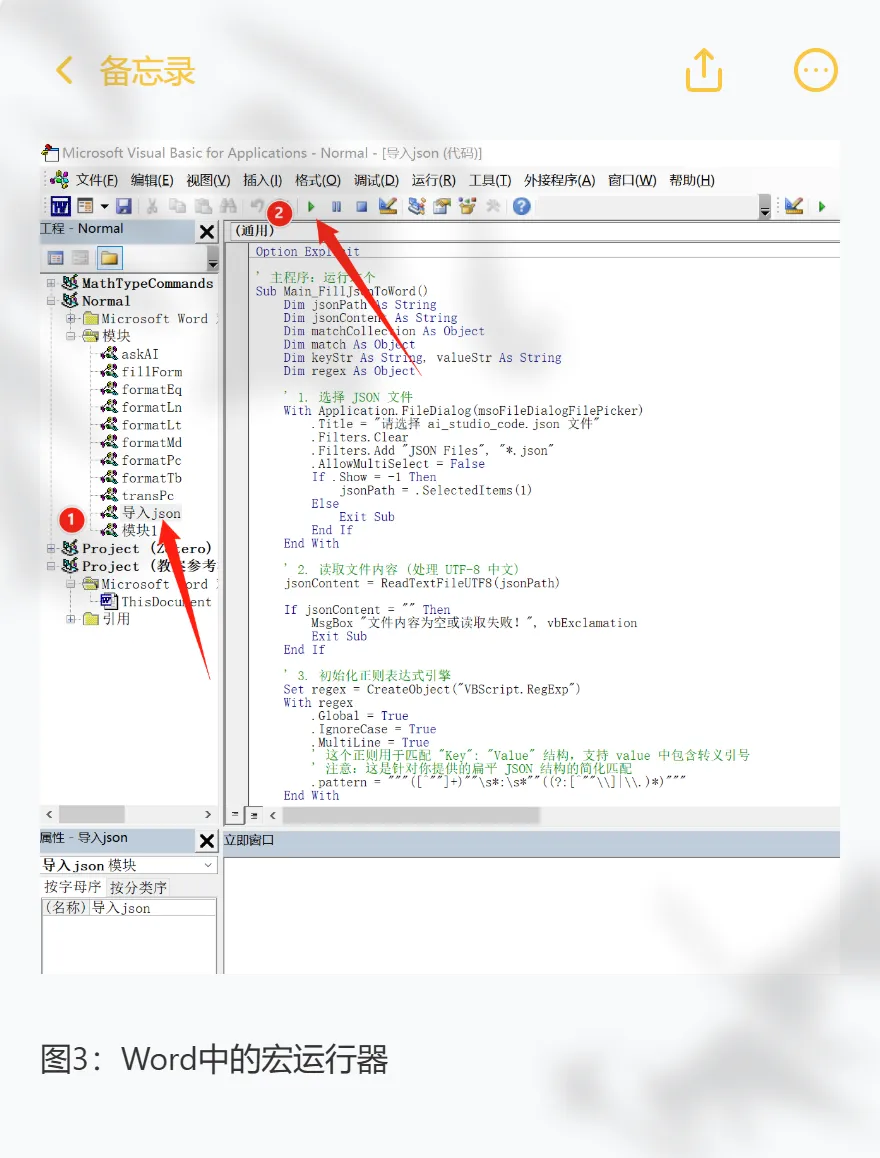
Option Explicit' 主程序:运行这个Sub Main_FillJsonToWord() Dim jsonPath As String Dim jsonContent As String Dim matchCollection As Object Dim match As Object Dim keyStr As String, valueStr As String Dim regex As Object ' 1. 选择 JSON 文件 With Application.FileDialog(msoFileDialogFilePicker) .Title = "请选择 json 文件格式" .Filters.Clear .Filters.Add "JSON Files", "*.json" .AllowMultiSelect = False If .Show = -1 Then jsonPath = .SelectedItems(1) Else Exit Sub End If End With ' 2. 读取文件内容 (处理 UTF-8 中文) jsonContent = ReadTextFileUTF8(jsonPath) If jsonContent = "" Then MsgBox "文件内容为空或读取失败!", vbExclamation Exit Sub End If ' 3. 初始化正则表达式引擎 Set regex = CreateObject("VBScript.RegExp") With regex .Global = True .IgnoreCase = True .MultiLine = True ' 这个正则用于匹配 "Key": "Value" 结构,支持 value 中包含转义引号 ' 注意:这是针对你提供的扁平 JSON 结构的简化匹配 .Pattern = """([^""]+)""\s*:\s*""((?:[^""\\]|\\.)*)""" End With ' 4. 执行匹配 If regex.test(jsonContent) Then Set matchCollection = regex.Execute(jsonContent) Application.ScreenUpdating = False ' 关闭屏幕更新加快速度 ' 5. 遍历每一对 Key-Value 并替换 For Each match In matchCollection keyStr = match.SubMatches(0) ' 获取键 (如:授课题目) valueStr = match.SubMatches(1) ' 获取值 ' 处理 JSON 转义字符 (如 \" 变 ") valueStr = Replace(valueStr, "\""", """") valueStr = Replace(valueStr, "\\", "\") ' 执行 Word 替换,自动加上 {{ }} Call ReplaceTextInDoc("{{" & keyStr & "}}", valueStr) Next match Application.ScreenUpdating = True MsgBox "数据填充完成!共处理 " & matchCollection.Count & " 个数据项。", vbInformation Else MsgBox "未在文件中找到有效的 JSON 格式数据。", vbExclamation End If ' 清理对象 Set regex = Nothing Set matchCollection = NothingEnd Sub' 辅助函数:突破 255 字符限制的查找替换Sub ReplaceTextInDoc(FindText As String, ReplaceText As String) Dim myRange As Range Set myRange = ActiveDocument.Content ' 重置查找参数 With myRange.Find .ClearFormatting .Replacement.ClearFormatting .Text = FindText .Forward = True .Wrap = wdFindStop .Format = False .MatchCase = False .MatchWholeWord = False .MatchWildcards = False .MatchSoundsLike = False .MatchAllWordForms = False End With ' 循环查找并替换(解决长文本问题) Do While myRange.Find.Execute ' 将找到的 Range 文本直接替换为新文本 ' 这种方法不受 Find.Replacement.Text 的 255 字符限制 myRange.Text = ReplaceText ' 将 Range 折叠到末尾,继续查找下一个 myRange.Collapse Direction:=wdCollapseEnd LoopEnd Sub' 辅助函数:以 UTF-8 编码读取文本文件 (防止中文乱码)Function ReadTextFileUTF8(filePath As String) As String Dim objStream As Object Set objStream = CreateObject("ADODB.Stream") With objStream .Type = 2 ' adTypeText .Charset = "utf-8" .Open .LoadFromFile filePath ReadTextFileUTF8 = .ReadText .Close End With Set objStream = NothingEnd Function